
If you use Microsoft 365 apps & services but do not have the paid Microsoft 365 Copilot add-on license then this article is for you.
You may be confused as to why Microsoft 365 Copilot announcements will impact you, if you don’t have a Microsoft 365 Copilot license. Well, at the start of 2025 Microsoft renamed the Microsoft 365 interface also known as the Microsoft 365 App to the Microsoft 365 Copilot App.
Many of us work with the Microsoft 365 website without realising it is the Microsoft 365 App and thus the name change may not have seemed relevant. But now when Microsoft announce changes to the Microsoft 365 Copilot App, they are referring to what we previous knew as the Microsoft 365 website, the mobile app and the Windows app.
On 23rd April 2025 Microsoft announced updates to Microsoft 365 Copilot including some changes to the Microsoft 365 Copilot app incl web, desktop & mobile. Some of these changes will impact on all users, even those without the paid Microsoft 365 Copilot add-on license. These changes are due to start rolling out in May 2025.
These include:
- A new home page and navigation pane on web and windows
- An updated mobile app
- On web & windows
- an updated Copilot Chat experience including access to chat history, Copilot Pages, and agents, within collapsible items on the navigation pane
- Search replacing Home
- Updated Create feature
- Self service upgrade options for Copilot
New Interface
Let’s first look at web and Windows.
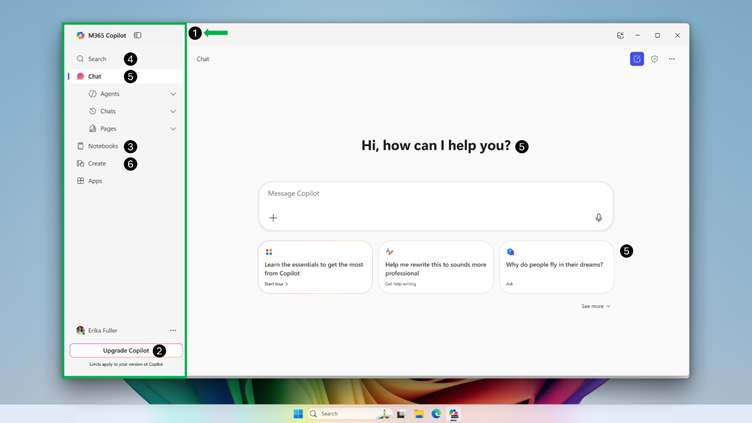
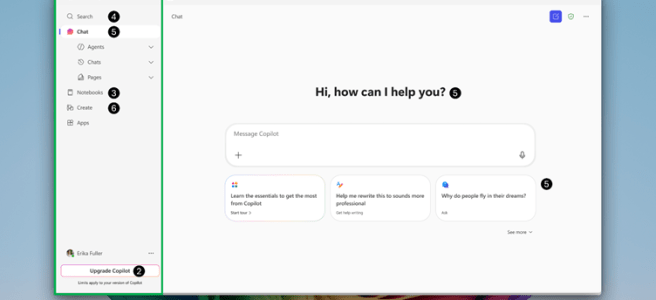
This image is taken from message center post MC1060780 and shows the updated Microsoft 365 App for Windows. Your web experience at https://m365.cloud.microsoft/ (formerly Microsoft 365.com or office.com) will also get the new look.
To be clear, we are talking about the Microsoft 365 Copilot app not other desktop apps such as Outlook, Teams, Word, Excel, PowerPoint. If you use the Office apps through the web then you will see this updated navigation pane, but the apps themselves will not be changed.
This updated experience in the Microsoft 365 App includes 6 changes which are numbered on the image and explained below. Also, for Windows 11 devices the Copilot key or Win + C shortcut will open the Microsoft 365 Copilot app.
1. Refreshed Navigation Pane – The Microsoft 365 Copilot app’s left navigation pane is updated and will now provides users access to items referred to as ‘modules’. By default the modules shown are expected to be Search, Chat, Notebooks, Create, and Apps. Users can pin or unpin apps and agents to the navigation pane. In the future Copilot will be able to come back to you later with responses/activity (known as Copilot asynchronous activity) and this will be indicated by toast notifications (pop ups) and notification style ‘bubble’ icons in the navigation pane.
2. Upgrade Copilot – Going forward users will be able to request a Microsoft 365 Copilot license from their admin, or self-service purchase a license, by selecting the Upgrade Copilot button present in the navigation pane. For admins, if you want to manage the Upgrade Copilot feature, refer to Manage self-service purchases and trials (for admins).
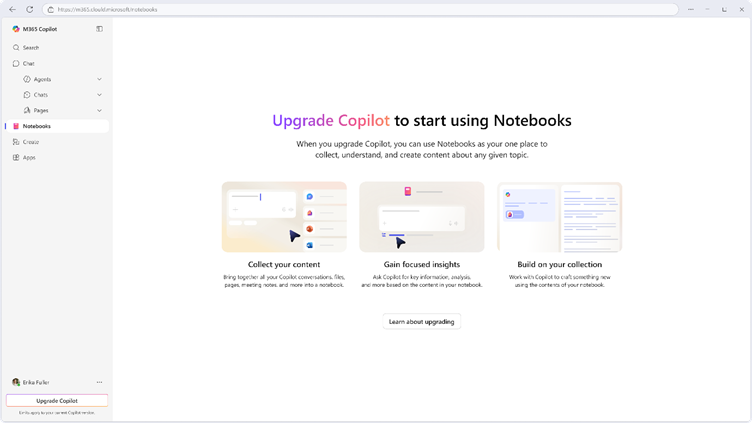
3. Notebooks – Although the new Notebooks module will show on the navigation pane this feature requires a Microsoft 365 Copilot license. Users without a Microsoft 365 Copilot add-on license will see the link to this module in the left navigation pane but if they select it, they will be shown a screen indicating that a license is required (shown below), along with additional information on the feature and how to upgrade.
4. Search – Search replaces the current Microsoft 365 Home page. Search will have an updated experience displaying key files in dedicated sections for easier access and a search bar.
5. Chat – Chat is the feature which currently had the Copilot icon and is named Copilot. It has become a heading with a collapsable navigation including links to chat history, Copilot Pages, agents and the Agent Store. Within the updated Chat app the prompt or input box is moving to the center of the screen with prompt suggestions below it.
6. Create – The Create module is an updated version of the current experience both allow you to create documents, presentations, and more.
The Microsoft 365 Mobile App will also see some changes.

This image is an annotated version of one shared in the Microsoft announcement blog.
Navigation pane – The lower navigation (1 on the image) will now include only Search, Chat, and Create with other modules (Pages, Agents, Chats, Apps) through the new navigation hamburger menu (2 on the image) in the top left of the UI.
Create – Create includes the options to create new Word, Excel PowerPoint and PDF files as well as the Scan, Extract, and Dictate option which were previous under Capture in the app.
Timescales:
- Targeted Release (Web, Windows): rolling out mid-May 2025 to late May 2025.
- General Availability (Web, mobile, Windows): rolling out late May 2025 to late June 2025.
Further Reading:
- Microsoft 365 Copilot: Your window into the world of agents | Microsoft 365 Blog
- Message Center Posts
- MC1060780 – Microsoft 365 Copilot app updates for licensed Microsoft 365 Copilot users
- MC1017114 – Self Service Purchases & Licence Requests
- Manage self-service purchases and trials (for admins)
What’s New In Microsoft 365 Copilot | April 2025 | Microsoft Community Hub
 Sara Fennah's Blog